

SKILL.md plus optional scripts, references, and assets) that agents load and run inside a sandbox.
The skills table
The paginated table lists every skill with these columns: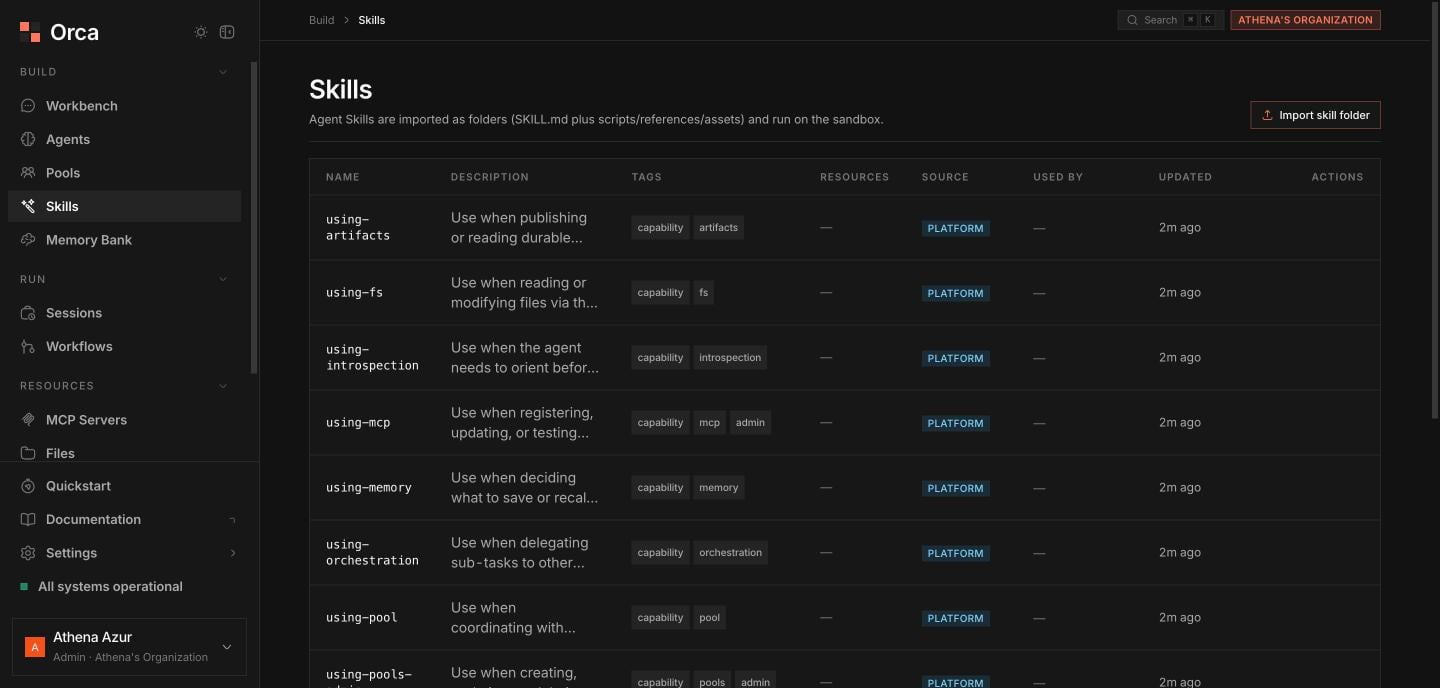
Skills — the platform capability bundles, imported as folders and run on the sandbox.
Importing a skill
1
Pick a folder
Choose Import skill folder and select the skill’s folder with the folder picker.
2
Review the dry-run preview
Orca runs a dry-run validation against the Agent Skills open standard and shows a preview: validation results, sandbox-requirement flags (whether the skill needs a sandbox), and any collision / overwrite warnings against existing skills.
3
Commit
Once the preview looks right, commit the import to add the skill to the org.
The dry run validates before anything is written, so you can catch a malformed
SKILL.md or an unexpected overwrite before it lands.Skill sheet
Opening a skill shows a file tree with content preview, rooted atSKILL.md. From here you can browse any bundled file, copy a file’s contents, and delete the skill.
Related
Skills
The Agent Skills standard and structure.
Sandboxes
Where skills execute.
Agents
Attach skills to an agent profile.