

Choose a delegation-first session
Workers are not exclusive to orchestration mode. Use/mode orchestrate when the parent should focus on investigation and coordination, make only basic native edits, and delegate substantial implementation and testing. See Orchestrate mode for the enforced parent restrictions and approval behavior. The routing and budget settings below configure workers separately from session mode.
Delegate deliberately
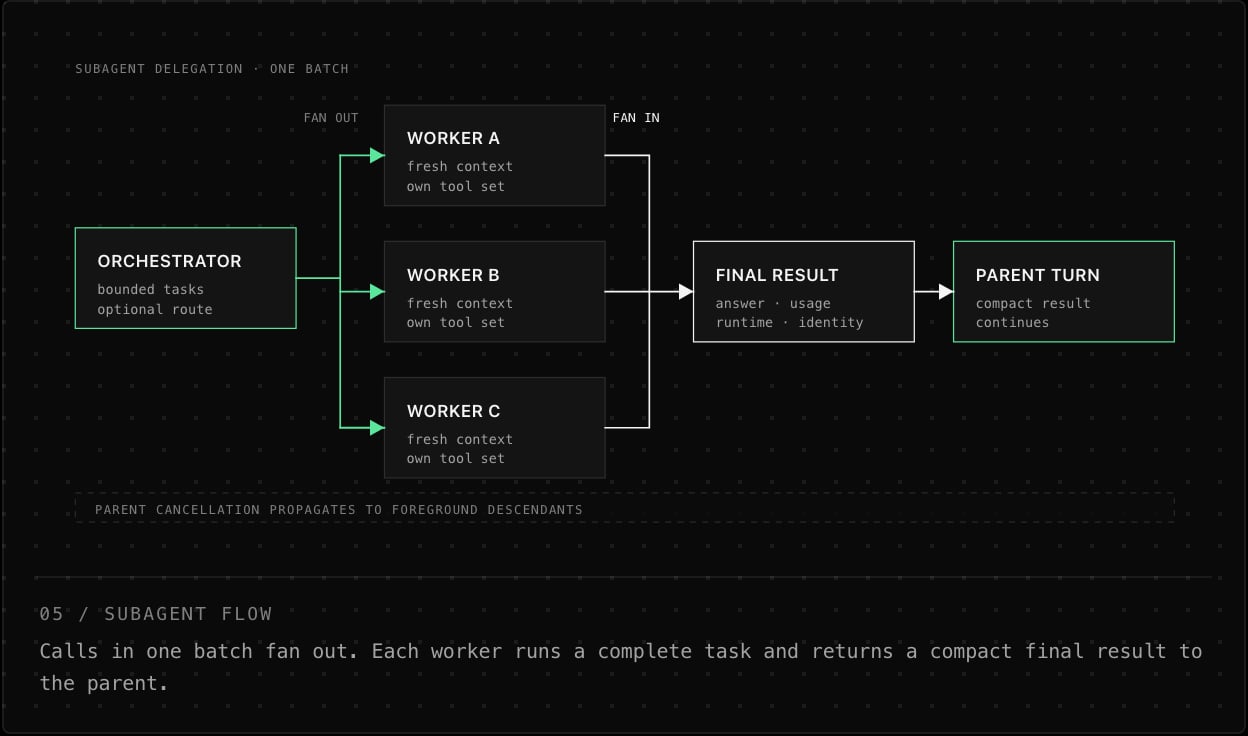
Give a subagent one bounded task, the expected result, and an explicit stopping condition. Good examples include: “inspect this module and return the smallest safe patch plan,” or “run the focused test and report whether the regression reproduces.”Keep the boundary: A worker does not see the parent conversation. Put the relevant paths, constraints, expected deliverable, and stopping condition in its task. Use parallel workers for independent questions; serialize work only when the later task depends on the earlier result.
One worker, one result
Route work across providers
In/subagents, select the local, fast, mid, or frontier model row, choose a provider, then search its catalog and select a model. Each tier saves one provider/model assignment. Every provider in /provider is selectable: local compatible endpoints, OpenAI, the OpenAI Codex subscription, Anthropic, OpenRouter, Vercel AI Gateway, and CheaperInference. Configure credentials first using /provider. The routing policy below controls which saved assignments the orchestrator may use.
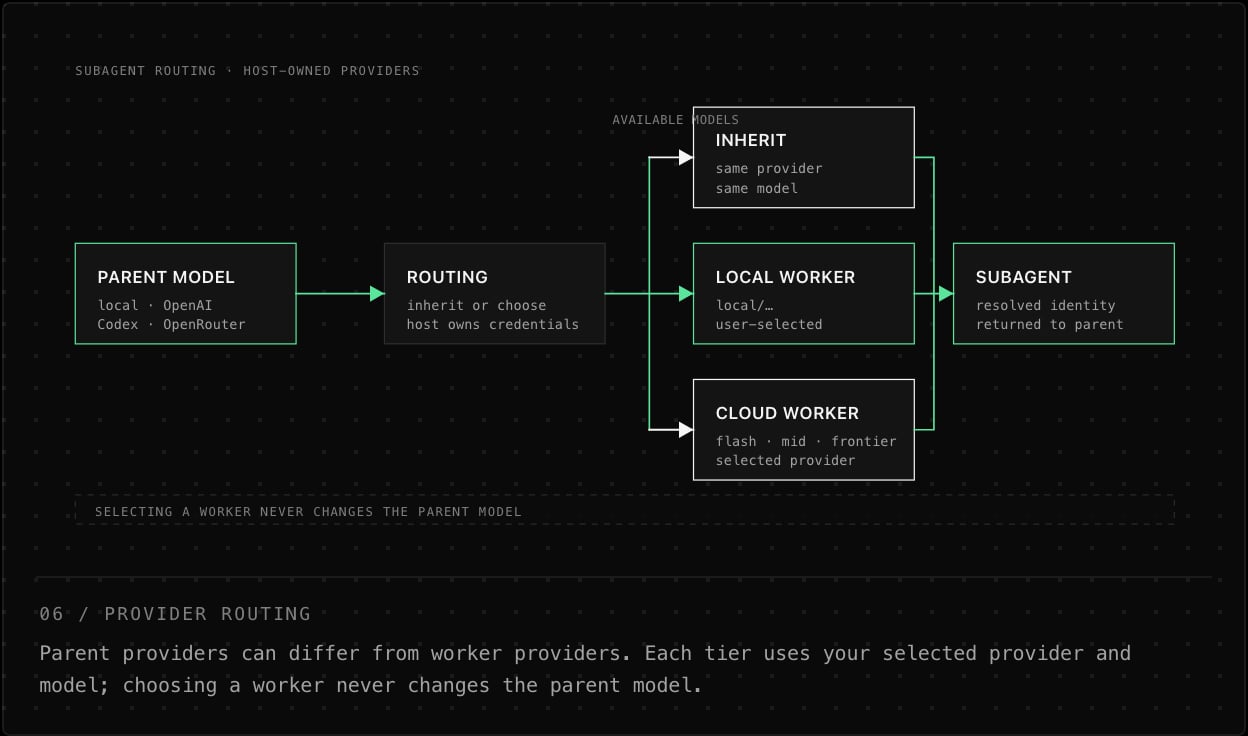
There is no built-in worker shortlist. Unconfigured tiers show “not selected”; inheritance remains available. Selections persist across sessions and parent-provider changes and apply to new spawns. Finish running subagents before changing a tier assignment; changes attempted while workers are active leave the selection untouched. A model selected from the active provider retains its custom endpoint URL. Existing shortlist-based configurations need their tier models selected again. Provider failures are surfaced without silently substituting another model.
Choose and enforce a routing policy
Open/subagents and choose the default route before delegating. The choice is applied immediately, saved for later sessions, shown to the orchestrating model in the subagent tool description, and enforced again when the tool call arrives. The model cannot bypass a fixed user choice by naming a different worker.
Route policy is not a model ID:
inherit, auto, and preference control what the orchestrator may choose. local, flash, mid, and frontier lock delegation to the preferred model saved for that tier. The fast tier retains the flash configuration key. Model IDs use tier/provider/model, such as local/local/my-model or flash/….
Each tier starts with the first available model as its preference; use the corresponding model row in
/subagents to change it. preference therefore means “let the orchestrator choose among my per-tier preferences,” while selecting a tier means “always use this tier’s one preferred model.”
Resolution examples
Nesting uses the same policy
The route and preferred-model settings are shared through the complete subagent tree, up to the host-configured depth limit (the CLI default is 1; the TUI offers preset choices). Underinherit, each child inherits its immediate parent: if auto first creates a flash worker and that worker later inherits, its child also uses that flash model. Under preference, every nested call must choose one of the same currently preferred models. A fixed tier remains fixed at every level.
auto and preference remain selected and use the catalog and preferences currently available. If preference has no available preferred model, no subagent call can pass until a model becomes available or you choose another route.
Set the worker budget
--subagent-depth N sets nesting depth from 1–5; ORCA_SUBAGENT_DEPTH provides the environment equivalent. In the UI, /subagents configures model route, preferred model per tier, depth, step budget, timeout, output cap, and retries.
At the depth limit, workers simply do not receive the
subagent tool, so recursion stops without a failed call. The terminal nests live worker activity under the parent tool call and collapses it to the final record when complete.
Run workers in the background
Subagent calls default tobackground: true. The tool returns immediately with a spawnId and a running or queued status while the worker continues independently. Its result, usage, runtime, and resolved provider/model identity are delivered to the parent automatically when ready, so the parent can continue other work.
background: false when the parent must wait for the answer in the same tool call. Use action: "list" to inspect active background workers, including their tasks, statuses, and identities. Use action: "cancel" with a spawnId, or action: "cancel_all", only when a worker should stop.
Keep work moving: Do not sleep and poll for completion. Continue independent work; background results are batched into the next parent model step or wake the parent after its turn.
Keep a sidekick for follow-ups
An ordinary worker answers once and is gone. A sidekick is a worker that stays alive for the rest of the session and keeps its own conversation, so you can send it follow-up tasks without re-explaining what it already found. Its bulky tool output stays in its context; the parent receives only the compact report.
The model manages sidekicks through the same
subagent tool. persistent: true creates one and returns its stable spawnId; action: "task" sends it the next task; action: "stop" releases it.
background: false to wait for the answer. Between tasks it shows as idle in the agent browser.
Lifetime: Sidekicks survive model and provider switches and reloads.
action: "cancel_all" leaves them alone. They stop on /sidekick stop, /clear, loading another session, and exit; nothing carries over to the next session. They use the configured worker tools and approvals and gain no permissions of their own.