

Add and manage a server
/mcp to open the server picker; space toggles the selected server. Servers persist in the config file and disabled entries retain their command.
How tools are exposed
mcp_search_toolssearches tool metadata across connected servers.mcp_select_toolaccepts the exact name of any tool in the connected catalog, without requiring a preceding search; its schema is available on the next model turn.mcp_featuresreads resources, invokes prompts, and handles argument completion for a specific server.
Discovery before execution
Connected servers do not place every remote schema in the model context. The intended discovery path is to search compact metadata, then select one exact tool when needed.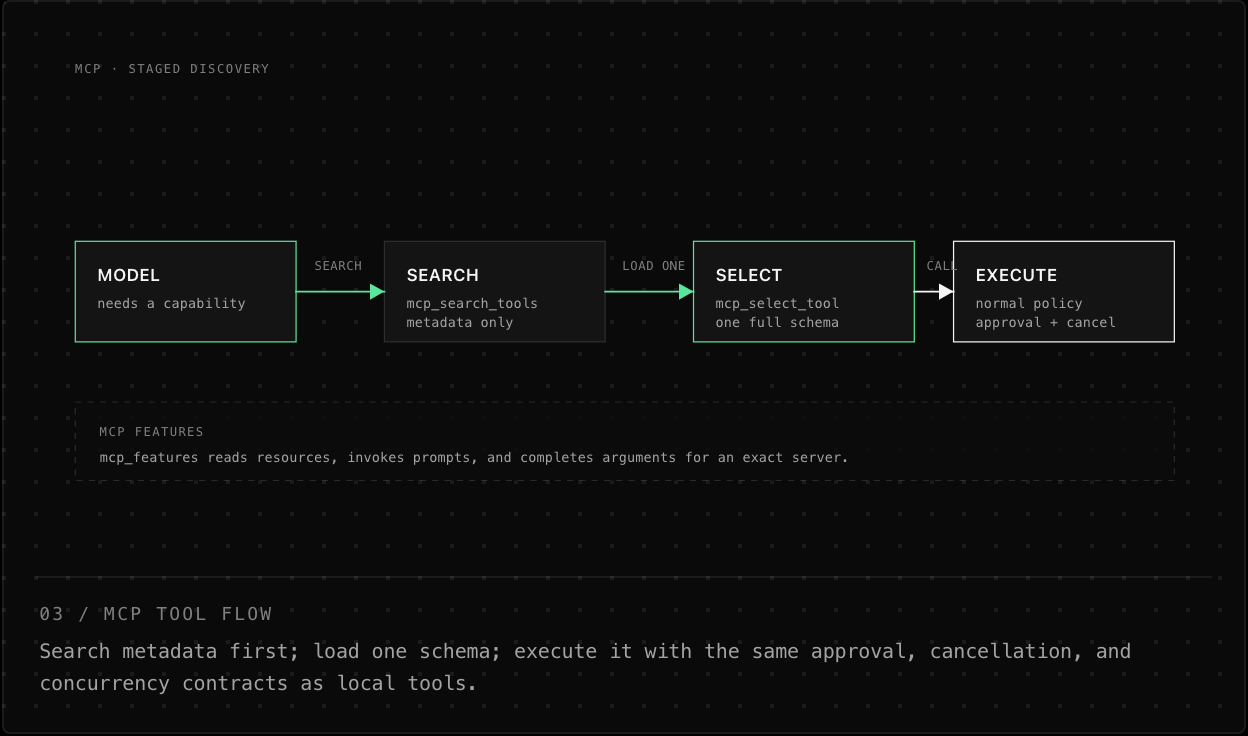
A guessed remote tool name is rejected until it has been selected. That keeps a large remote catalog from consuming context before it is useful.
Connection lifecycle
Interactive startup and reload initialize MCP servers in the background, with up to four connections in flight and a 30-second total connection timeout per server. The underlying MCP client also bounds initialize and tools/list requests, but those request timeouts do not extend the CLI’s overall connection deadline. A startup notice indicates that MCP is connecting in the background and integration tools may be unavailable until initialization completes; local tools and the UI remain usable while integration tools are pending. Headless runs await initialization before running the prompt. Each configured stdio server is initialized and checked independently. A failed server reports its reason and does not prevent the others from connecting. Toggling one server reloads only what changed; use the MCP picker to enable, disable, and reconnect it. Completed initialization publishes integration tools at a worker command boundary, without changing the tool set of a running agent or resetting local background processes and Python/Bun interpreter state. Configuration changes during initialization queue one fresh reload; exiting cancels pending connection work. Remote tools remain normal harness tools once selected: approvals, cancellation, output limits, and keyed per-server concurrency still apply. Interrupted exchanges close the serialized server connection rather than reusing a potentially stale request.Command and credential notes
Standalone/mcp add names must contain only letters, digits, -, or _, and must not start with -. Commands must begin with a stdio executable, not an option or bare HTTP URL. Invalid registrations are rejected before saving; invalid existing entries remain visible but are not launched. Standalone MCP launch commands split on whitespace and run without a shell: no quoting, variable expansion, or per-server environment exists. Give a server credentials through the environment used to launch Orcacode. The UI redacts recognizable secrets in server commands where it can.
Plan mode: Plan mode denies all MCP tools, including newly discovered tools, by design. Orchestrate mode also blocks MCP calls in the parent; delegate that work to a worker.