

Project instructions
All applicable files are read at startup (up to 32 kB each) and appended to the system prompt. A live user request takes precedence. Changes appear on the next session, or after
/clear in a running session.
Skill roots and precedence
Orcacode scans project locations before user locations, so a repository can provide its own procedure without asking contributors to move their existing skills.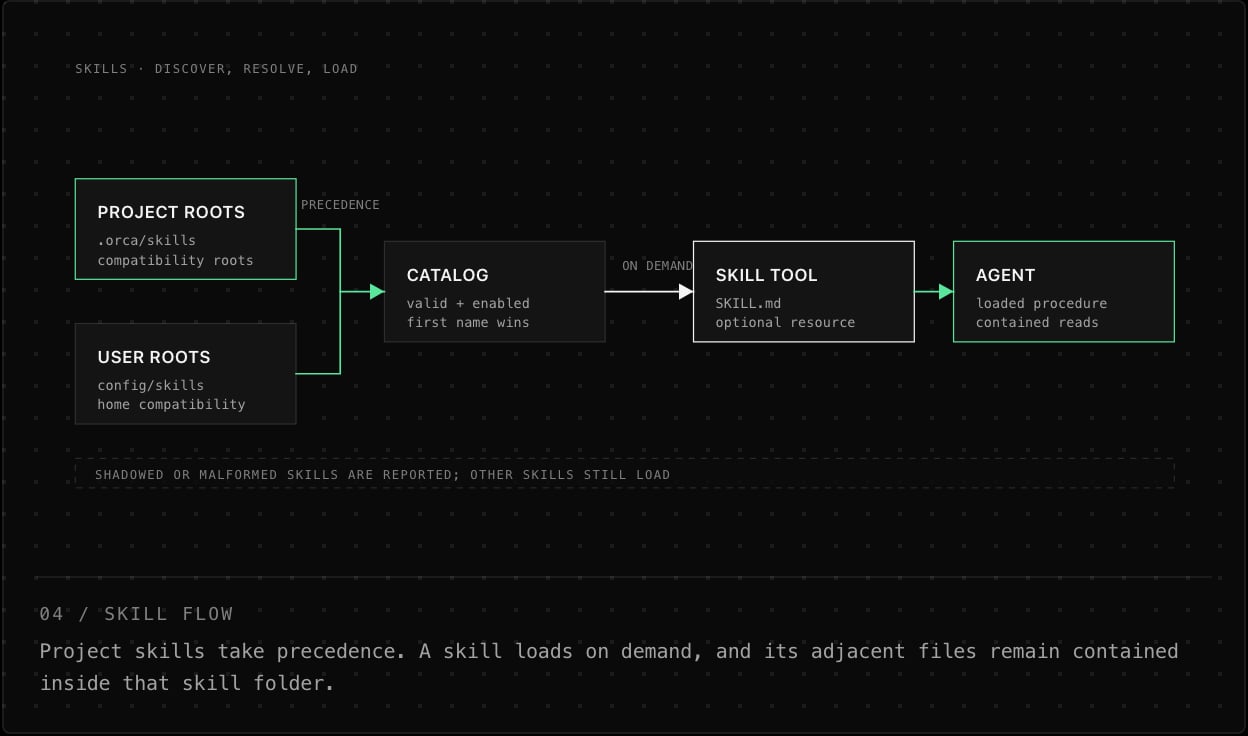
When two valid skills share a name, the earlier root wins and the later copy appears as shadowed in
/skills. A malformed skill is reported but does not stop other skills from loading.
Author and install skills
/skills create writes a starter skill to .orca/skills; use --global for the config-directory skill folder. /skills add installs into the managed config folder by default; --here installs into the project. Read an installed skill before enabling it: the body is instruction text the agent can follow. /skills reload rescans workspace and user skill roots; enabled Agent Plugin skills are fixed for this process and join the catalog on the next launch.
Skill format
A skill is a directory containingSKILL.md. Its frontmatter requires a description; the name is optional and defaults to the directory name. Names must be 1–64 bytes, start with an ASCII letter or digit, and contain only ASCII letters, digits, hyphens, underscores, or periods.
/skills show <name> to inspect discovery state and /skills remove <name> to delete skills Orcacode installed. It will not delete a compatibility skill owned by another tool.
Load a skill
Use/skills to list and toggle discovered skills. During a task, the agent uses the skill tool to load a skill’s instructions. The initial response lists available resource files; the agent can read one on demand using the resource argument. A standalone, exact $skill-name token for an enabled skill explicitly requests it; attached punctuation (such as $release,) does not match.
Skills in the SDK
For embedded hosts,Skills::preview(source) inspects source skills without installing them. After installing or scaffolding skills, call reload() to update the catalog. Enablement and catalog changes affect the skill tool at the next run boundary, not during an active run. See SDK host assembly for setup.