> ## Documentation Index
> Fetch the complete documentation index at: https://docs.orcapods.ai/llms.txt
> Use this file to discover all available pages before exploring further.
# Workspace & members
> Organization settings, member management, and your personal account.
This area covers the three settings surfaces that define who you are in Orca and who you work with: your **Organization**, its **Members**, and your personal **Account**. Roles referenced below are explained in [Access control](/concepts/access-control).
Actions marked **admin-only** are hidden or disabled for members.
## Organization
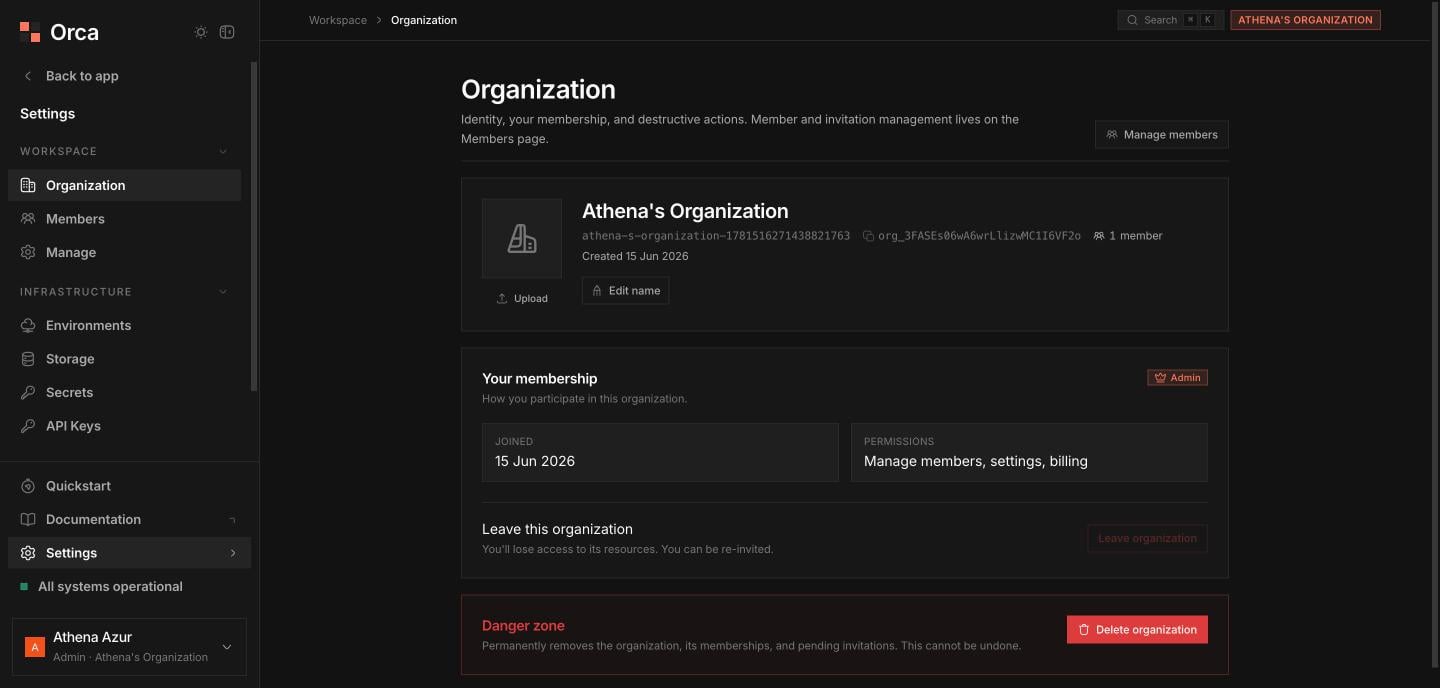
The Organization screen manages your org's identity and lifecycle.
* **Identity hero** — the org **logo** (upload / remove, *admin-only*), an inline **name** edit (*admin-only*), and a copyable **tenant ID**, along with the **slug**, **member count**, and **created date**.
* **Manage members** — a button through to the Members screen.
* **Your membership** — your **role**, **join date**, and **permissions**, plus **Leave organization**.
* **Danger zone** — **Delete organization**.
**Leave organization** is blocked if you're the **sole admin**. **Delete organization** is admin-gated and requires **type-to-confirm**.
 ## Members
Manage who belongs to the org and invite new teammates.
* **Stat tiles** — **total members** and **your role**.
* **Search** — filter the members list.
* **Active-members table** — avatar, **role pill**, **joined** date, and **remove member** (*admin-only*; you can't remove yourself).
* **Invite teammate** — a dialog taking an **email** and a role of **admin** or **member** (*admin-only*).
* **Pending invitations** — a table of outstanding invites with **revoke** (*admin-only*).
## Account
Reach your personal **Account** settings from the **user chip** at the bottom of the sidebar.
* **Name** and **email**.
* **Delete account** danger zone — **type-email-to-confirm**, with a warning if you're the **sole admin** of any organization.
## Related
Roles, permissions, and admin gating.
Keys inherit their creator's role.
## Members
Manage who belongs to the org and invite new teammates.
* **Stat tiles** — **total members** and **your role**.
* **Search** — filter the members list.
* **Active-members table** — avatar, **role pill**, **joined** date, and **remove member** (*admin-only*; you can't remove yourself).
* **Invite teammate** — a dialog taking an **email** and a role of **admin** or **member** (*admin-only*).
* **Pending invitations** — a table of outstanding invites with **revoke** (*admin-only*).
## Account
Reach your personal **Account** settings from the **user chip** at the bottom of the sidebar.
* **Name** and **email**.
* **Delete account** danger zone — **type-email-to-confirm**, with a warning if you're the **sole admin** of any organization.
## Related
Roles, permissions, and admin gating.
Keys inherit their creator's role.