> ## Documentation Index
> Fetch the complete documentation index at: https://docs.orcapods.ai/llms.txt
> Use this file to discover all available pages before exploring further.
# Quickstart templates
> Create your first agent or pool from a pre-filled template.
The **Quickstart templates** screen is the fastest way to get something running: pick a template, and Orca opens the create dialog **pre-filled** so you only have to review and confirm. For the full walkthrough, see the [Quickstart guide](/quickstart).
The screen has two tabs.
Templates that create one agent. Cards are grouped into **blank**, **solo**, and **real-world** categories, each tagged with **feature chips** showing what the template uses. Clicking a card opens the **New-agent** dialog, pre-filled from the template.
Templates that create a multi-agent pool. Cards are grouped into **pool** and **orchestrate** categories. Clicking a card opens the **New-pool** dialog, pre-filled.
Each pool card **lists the agents it requires**, and lets you **create any missing agents inline** as part of setup.
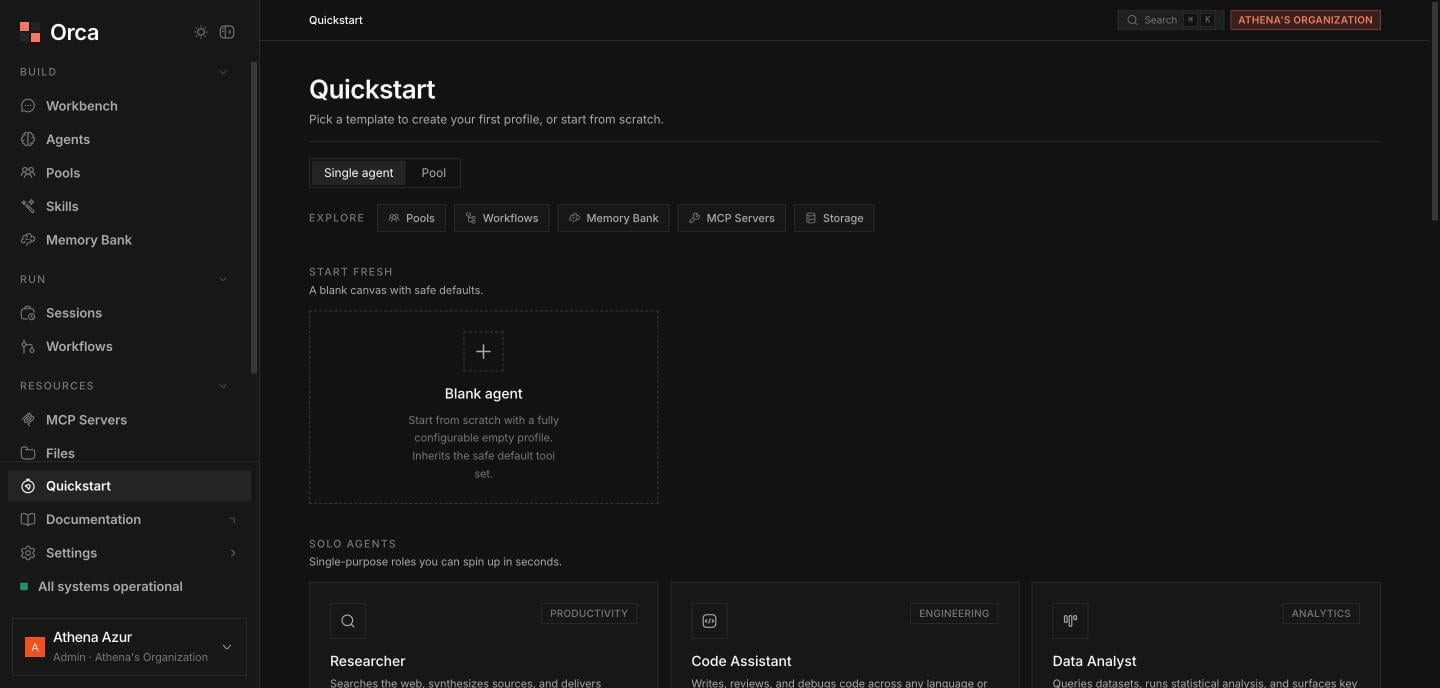 ## Explore strip
An **"Explore" feature-pill strip** links out to the building blocks a template might use:
Group agents into a shared workspace.
Multi-agent DAG orchestration.
Memories agents write at runtime.
External tools for your agents.
Where agents publish artefacts.
## Related
The full getting-started walkthrough.
Build and manage agent profiles.
Group agents into a pool.
## Explore strip
An **"Explore" feature-pill strip** links out to the building blocks a template might use:
Group agents into a shared workspace.
Multi-agent DAG orchestration.
Memories agents write at runtime.
External tools for your agents.
Where agents publish artefacts.
## Related
The full getting-started walkthrough.
Build and manage agent profiles.
Group agents into a pool.