> ## Documentation Index
> Fetch the complete documentation index at: https://docs.orcapods.ai/llms.txt
> Use this file to discover all available pages before exploring further.
# MCP Servers
> Register MCP servers, connect SaaS apps via OAuth, and manage active connections.
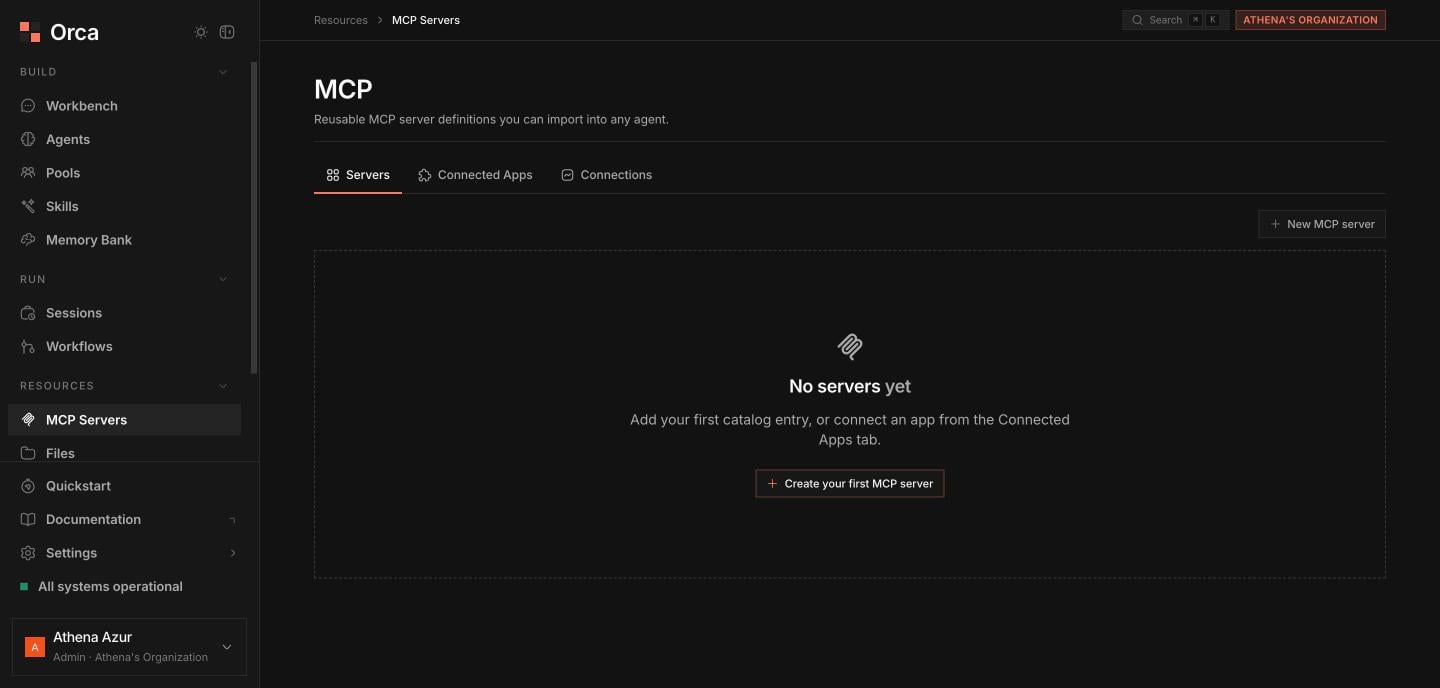
The **MCP Servers** screen is where you give agents tools from the outside world — Model Context Protocol servers you host, and SaaS apps you connect over OAuth. For what MCP is and how agents consume it, see [MCP integration](/concepts/mcp-integration).
The screen has three tabs.
Your reusable MCP catalog entries.
OAuth into 250+ SaaS apps via Composio.
Active and in-flight OAuth connections.
## Servers
This tab is your catalog of reusable MCP servers. Each entry can be attached to any agent, so you register a server once and reuse it everywhere.
 ### Add or edit a server
Click **New server** (or **Edit** on a row) to open the server dialog.
| Field | Notes |
| ------------------ | ---------------------------------------------- |
| **Name** | Display name in your catalog. |
| **Description** | Optional summary of what the server provides. |
| **URL** | The server endpoint. |
| **Transport** | `http` or `sse`. |
| **Custom headers** | A headers editor for auth and routing headers. |
Header values can reference the secret vault with `secret://` (for example an `Authorization` header set to `secret://my-mcp-token`). The plaintext is resolved at request time and never stored in the header itself. See [Secrets](/concepts/secrets).
Click **Test connection** to reach the server. On success it shows the round-trip **latency** and the server's **tool list**, so you can confirm the URL, transport, and headers before saving.
You can **create**, **edit**, and **delete** catalog entries from this tab.
Rows that are **owned by a Connected App** are managed for you and shown read-only — edit or remove them from the **Connected Apps** or **Connections** tab instead.
## Connected Apps
This tab connects agents to SaaS apps through **Composio**, which brokers OAuth to 250+ providers (Gmail, Slack, Notion, GitHub, and more). See [Connected apps](/concepts/connected-apps).
The tab is an **app-card gallery** with a **search** box and a **category filter**.
Search or filter by category, then pick the app card.
Click **Connect**. An **OAuth popup** opens for you to authorize. Orca **polls** the connection until it reaches **ACTIVE**.
On success Orca **auto-registers** an MCP server for the app — it appears (read-only) under **Servers** and is ready to attach to agents.
Use **Disconnect** on a connected app to revoke it.
If the Composio integration isn't configured for your deployment, this tab shows a setup hint instead of the gallery.
## Connections
This tab is a table of every active and in-flight OAuth connection, so you can audit what's linked and clean up stale entries.
| Column | Meaning |
| -------------- | --------------------------------------------------- |
| **App** | The SaaS app that was connected. |
| **Provider** | The underlying OAuth provider. |
| **Status** | `ACTIVE`, `INITIATED`, `FAILED`, or `EXPIRED`. |
| **MCP server** | The auto-registered server backing this connection. |
| **Agents** | Which agents have access. |
| **Connected** | When the connection was established. |
Click **Disconnect** on a row to revoke the OAuth grant and tear down its connection.
## Related
How agents discover and call MCP tools.
OAuth-based SaaS integrations via Composio.
Store tokens referenced as `secret://`.
Attach MCP servers to an agent.
### Add or edit a server
Click **New server** (or **Edit** on a row) to open the server dialog.
| Field | Notes |
| ------------------ | ---------------------------------------------- |
| **Name** | Display name in your catalog. |
| **Description** | Optional summary of what the server provides. |
| **URL** | The server endpoint. |
| **Transport** | `http` or `sse`. |
| **Custom headers** | A headers editor for auth and routing headers. |
Header values can reference the secret vault with `secret://` (for example an `Authorization` header set to `secret://my-mcp-token`). The plaintext is resolved at request time and never stored in the header itself. See [Secrets](/concepts/secrets).
Click **Test connection** to reach the server. On success it shows the round-trip **latency** and the server's **tool list**, so you can confirm the URL, transport, and headers before saving.
You can **create**, **edit**, and **delete** catalog entries from this tab.
Rows that are **owned by a Connected App** are managed for you and shown read-only — edit or remove them from the **Connected Apps** or **Connections** tab instead.
## Connected Apps
This tab connects agents to SaaS apps through **Composio**, which brokers OAuth to 250+ providers (Gmail, Slack, Notion, GitHub, and more). See [Connected apps](/concepts/connected-apps).
The tab is an **app-card gallery** with a **search** box and a **category filter**.
Search or filter by category, then pick the app card.
Click **Connect**. An **OAuth popup** opens for you to authorize. Orca **polls** the connection until it reaches **ACTIVE**.
On success Orca **auto-registers** an MCP server for the app — it appears (read-only) under **Servers** and is ready to attach to agents.
Use **Disconnect** on a connected app to revoke it.
If the Composio integration isn't configured for your deployment, this tab shows a setup hint instead of the gallery.
## Connections
This tab is a table of every active and in-flight OAuth connection, so you can audit what's linked and clean up stale entries.
| Column | Meaning |
| -------------- | --------------------------------------------------- |
| **App** | The SaaS app that was connected. |
| **Provider** | The underlying OAuth provider. |
| **Status** | `ACTIVE`, `INITIATED`, `FAILED`, or `EXPIRED`. |
| **MCP server** | The auto-registered server backing this connection. |
| **Agents** | Which agents have access. |
| **Connected** | When the connection was established. |
Click **Disconnect** on a row to revoke the OAuth grant and tear down its connection.
## Related
How agents discover and call MCP tools.
OAuth-based SaaS integrations via Composio.
Store tokens referenced as `secret://`.
Attach MCP servers to an agent.